

January/February 2003 vol.9 no.1 issn 1082-4383
| |
|
|
|
Highlights in this Issue
New netLibrary Shared Collection
Offer Available for Nebraska Libraries
The Nebraska Library Commission and NEBASE are partnering with SOLINET,
another OCLC network, to offer a new shared collection of netLibrary eBooks.
Books in Print Lists Makes Book Ordering Easier
Neligh Public Library discovers hidden treasure in Books in Print.
Vernon Library Supplies Offers Discount to Nebraska
Libraries
Vernon Library Supplies is now offering direct discounts to Nebraska libraries
through the Nebraska Library Commission for the 2003 year.
OCLC Web Information
Sessions
Stress free Spanish language collection development.
OCLC CatExpress Offer for
New Subscribers: 13 Months for the Price of 12
NEBASE is offering a free trial month of OCLC CatExpress access to new
subscribers.
| N3 |
|
|
NEBASE |
TWO NEW NEBASE FULL CATALOGING MEMBERS
Congratulations to our two new NEBASE full cataloging members:
St. Gregory the Great Seminary (GEJ) and Our Lady of Guadalupe Seminary (OLDGD).
Previously CatExpress members, both seminaries have moved up to full cataloging
members of NEBASE.
NEW netLIBRARY SHARED COLLECTION OFFER
AVAILABLE FOR NEBRASKA LIBRARIES
The Nebraska Library Commission and NEBASE are pleased to announce a new offer
of netLibrary eBooksfor 2003. This year we are partnering with another OCLC
regional network, SOLINET, in the purchase of a new and larger shared
collection. The new Shared Collection will include new content from the top
academic and trade publishers in subjects suited for academic, public and school
libraries. The goal for this collection is 10,000 titles. As libraries purchase
into the collection, titles will be bought and made available. The first part
of the collection is expected to be available in spring of 2003.
As a subscriber, the following features will be available to you:
| N3 |
|
|
Training |
SERIALS CATALOGING BASICS WORKSHOP OFFERED
NEBASE has added two Serials Cataloging Basics workshops to its spring calendar.
Margaret Mering, Principle Serials Cataloger at the University of Nebraska at
Lincoln will teach the workshop on March 12 and again on March 28 at the
Nebraska Library Commission offices in Lincoln.
This workshop will provide an introduction to the cataloging of serial
publications. It will cover changes to serials cataloging rules found in the
most recent amendments to AACR2. Workshop topics will include defining what is
and is not a serial, reviewing the parts of a catalog record that are unique to
serials, learning what are considered major and minor title changes, and
cataloging electronic journals.
Cataloging staff who are new to cataloging serials on the OCLC system or wanting
a refresher are the target audience for the 6 hour workshop.
To find out more about the workshop, prerequisites and how to register, please
visit the NEBASE OCLC Workshop web site at: </netserv/nebase/oclcworkshopsdesc.html>.
Shannon Behrhorst
Network Services Director
Nebraska Library Commission
The following workshops have been scheduled. The location and date as well as a description of each of the
workshops can be found at </netserv/nebase/oclcworkshopsdesc.html>.
To register for any of the workshops, please complete the online registration
form at </netserv/nebase/oclcworkshops.html#reg>.
The workshop fee for NEBASE libraries is $10. If you are not a NEBASE library*,
please check the registration form for your workshop fee. If you have any
questions, please contact Jeannette Powell at 402-471-7740 or 800-307-2665 or
e-mail Jeannette Powell
for registration fee.
*NEBASE libraries are Nebraska libraries who use OCLC cataloging or interlibrary
loan services or who subscribe to FirstSearch. Although libraries who subscribe
only to FirstSearch are eligible to pay the $10 workshop fee, they must pay by
check.
| N3 |
|
|
Databases |
SEARCHING FOR BIOGRAPHIES IN WORLDCAT USING
THE BIOGRAPHY SUBTYPE LIMIT
Awhile back OCLC added three new Subtype limit menus to the WorldCat database.
These menus, which appear immediately beneath the "Limit type to" area of the
Advanced Search screen, include Audience subtype limits (any, juvenile, not
juvenile), Content subtype limits (fiction, not fiction, biography,
thesis/dissertation, music, non-music recording), and Format subtype limits
(large print, Braille, manuscript, microform, not microform, CD audio, cassette
recording, LP recording, VHS tape, DVD video).
Several of these new limit options have obvious value. If you're interested in
juvenile fiction about divorce, for instance, being able to apply the juvenile
and fiction limiters saves you from having to scroll through thousands of
records for adult non-fiction books on the topic. Unfortunately, at least at
first glance, it's easy to underestimate the value of some of the other new
limit options. For example, when I first noticed the biography limit option, I
dismissed it as something I'd probably never use. My thinking was, if you wanted
to search for a biographical book about a person, wouldn't you just do a subject
search on that person's name?
Of course, this works well when you know the name of the person whose biography
you'd like to read. But what if you don't? What if you like to learn about
history by reading biographies of people who lived through certain historical
events? What if you're a student researching potential careers and you'd like to
read about someone who worked in a particular field? What if you were recently
diagnosed with a medical condition and you'd like to read about someone else
who's suffered from the same thing? In these instances, the biography limit
option comes in quite handy.
To search for biographies when you don't have a particular person in mind, try
typing into the first "Search for:" box on the Advanced Search screen a word or
phrase that describes a time period, a career, a medical condition, or some
other topic that interests you. Select either Subject or Keyword from the
corresponding drop-down index menu. Scroll down to the Subtype limits area of
the screen and select Biography from the drop-down Content menu. Click on the
Search button. This should retrieve a list of biographies and autobiographies
that are in some way related to the terms you typed in the first "Search for:"
box.
Here are some examples of searches you might perform:
BOOKS IN PRINT LISTS MAKES BOOK ORDERING EASIER
The headline reads: "Eureka! Hidden treasure has been uncovered at
the Neligh Public Library". Within the Nebraska Library Commission's
free databases is a miracle program for our library and staff. Books
in Print. With the help of Allana Novotny, we now use "lists" in
Books in Print to do our book order.
Using the "lists" in Books in Print has greatly simplified our book
ordering process and has nearly erased Works Database headaches.
Each staff member enters the books he or she wants to consider
ordering by choosing select. Books in Print provides the records,
synopses, reviews, awards, book company availability, and even
author biographies. From lists, we choose our selections. We can
even tell how many copies of a selection our book company has in its
warehouse. Next, the chosen titles are transferred to an order list,
a brief record is chosen and we e-mail the book order to the jobber.
Using "move list" we transfer the book order to a new books list,
ask the program to include the synopses and e-mail our patrons
informing them of the upcoming titles the library will receive. If a
patron asks to be put on the waiting list for a new book, we add
their request to "comments" found with each book record. This
comment will show up whenever we check the record. "Comments" are
also used when we enter a book to consider. For example: is it a
patron request, does it go with a title we already own, is this
selection of particular interest in our community, etc. So far, we
have created three working lists on Books in Print, they are all
active and are password protected. Books in Print has become our
miracle solution.
Today I needed to contact our book company about some back orders.
Thanks to Books in Print, I had the full record of each questioned
selection literally at my fingertips. Thank you, Books in Print and
thank you Nebraska Library Commission for making my day easier by
providing this wonderful resource.
Kate Ostenrude
Director
Neligh Public Library
HOW TO USE THE BOOKS IN PRINT LISTS FEATURE
Lists is a feature in Books In Print (BIP) that allows you to save your search
results from one or more searches over a period of time. A list can hold up to
200 titles and will remain on the system for a default of six months unless it
is deleted or the "expires on" date is changed. Titles can be added, removed or
even moved from one list to another. Comments can be added for a specific title
or the complete list. You can also print, e-mail and downloaded the complete
list or just selected titles.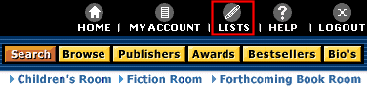
To create a new list click on the Lists icon located on the top navigational
bar. Click on Create New List button. Enter a list name. Make your list name
something distinct yet easy to remember. At this point you can also enter
comments about the list. For example you might want to note that this is a list
of titles you would like to order.
In the List Type box select Password Protected. Enter your password twice and
your e-mail address. If you forget your password you can have the system e-mail
it to you; however you must enter the same e-mail address that you used when you
created the list. Click on the Create List button. I would STRONGLY recommend
that you password protect your list. Because we have a statewide license
multiple libraries have access to the account. Password protecting the list
prevents accidental deletions.
Now you are ready to add titles to your list. To do this you will need to
perform a search. From the results screen you can add selected titles or add all
of the results on the current page to the list at once.
To select a title click on the box in front of the title, a checkmark will
appear in the box. (See arrow A).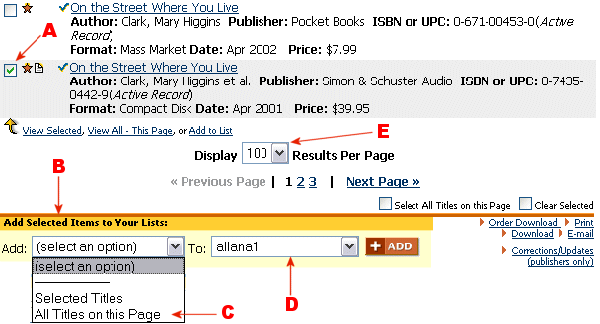
To add selected titles or all titles on the current results page to a list go to
the Add Selected Items to Your Lists: area at the bottom of the results page.
(See arrow B) Use the Add menu to add either all titles or selected titles. (See
arrow C) Next, select the list you would like to add the titles to. (See arrow
D) At this point you can also select Create New List to begin a new list using
your current search results. Click on the Add button. If your list is password
protected you will need to enter your password. Keep in mind that you may have
more than one page of search results. By default 25 records will be displayed
per page. You can increase this number to 50, 75 or 100 by using the drop down
Display box. (See arrow E) If you would like to continue to add titles to your
Lists you will need to use the back button to return to your search results.
You can also add an item to a list from the Full Description screen. When you
are viewing the full description of a record scroll to the bottom of the screen,
here you will find an area labeled Add This Item To. In the dropdown box select
the name of the list you would like to add the title to.
After you have created a list there are a number of actions that can be
performed on the entire list. Under the Actions for the entire list: you can do
the following:
SEARCHING THE OMNIFILE FULL TEXT DATABASE USING THE NEW H. W. WILSON
INTERFACE
When you access the H. W. Wilson OmniFile Full Text Select and Wilson Biographies Plus
Illustrated, you will see a new interface. There have been a number of great enhancements
that improve both of these databases. One of the major enhancements is how
searching works in the OmniFile and the ability to search the full text of
documents.
There are two types of searching available in the Wilson interface: Guided
Search and Search. The Guided Search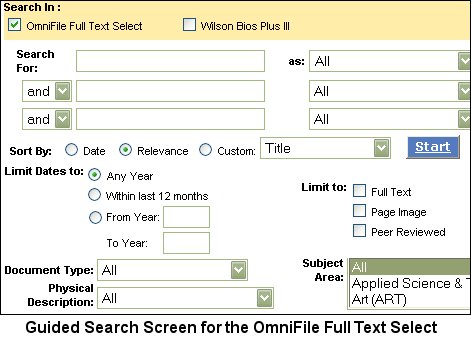 screen is sometimes
referred to as the Advanced Search. It is designed to help users enter a search
and is the default search screen. The options available for the Guided Search
will depend on which database you are searching. When using the Guided Search
in the OmniFile Full Text Select the default search "As" field is the All field.
There is a set of rules the search engine follows when it performs an All
search. A search in the All field will search for the term(s) entered and all
stemmed alternatives of the term(s). As the search is processed it will first
find matches in the Subject field and results that match will receive a 100%
ranking. Next, it will use the database's Thesaurus to identify any preferred or
used for subject headings. For example if you did a search on flu it would find
the subject heading of Influenza since that is the subject heading that is used
for flu. These results will receive a score of 90%. Any terms that partially
match subject fields will receive an 80% score. At this point the search engine
will start looking at the documents to see how often a word occurs in relation
to the size of the document and the proximity of the search terms and assign
scores to the results. These results will receive a score of 70% or below. The
system will also sort each percentage category by date. For example all results
that receive a score of 100% will be sorted by date with the newest records
first. It will then sort all records with a score of 90% by date and so on.
screen is sometimes
referred to as the Advanced Search. It is designed to help users enter a search
and is the default search screen. The options available for the Guided Search
will depend on which database you are searching. When using the Guided Search
in the OmniFile Full Text Select the default search "As" field is the All field.
There is a set of rules the search engine follows when it performs an All
search. A search in the All field will search for the term(s) entered and all
stemmed alternatives of the term(s). As the search is processed it will first
find matches in the Subject field and results that match will receive a 100%
ranking. Next, it will use the database's Thesaurus to identify any preferred or
used for subject headings. For example if you did a search on flu it would find
the subject heading of Influenza since that is the subject heading that is used
for flu. These results will receive a score of 90%. Any terms that partially
match subject fields will receive an 80% score. At this point the search engine
will start looking at the documents to see how often a word occurs in relation
to the size of the document and the proximity of the search terms and assign
scores to the results. These results will receive a score of 70% or below. The
system will also sort each percentage category by date. For example all results
that receive a score of 100% will be sorted by date with the newest records
first. It will then sort all records with a score of 90% by date and so on.
Another useful search "As" field is the Journal Name. This will allow you to
limit your search to a specific journal title. You may also notice that there is
a Source field. The difference between the Journal Name and the Source field is
that the Journal Name only contains the name of the journal, while the Source
includes the journal name, volume number, publication date, and page numbers. A
complete list of titles that are included in the database can be found in Help
under the Journal Directory tab.
An additional improvement includes the addition of the "Text" field as a new
field to search. This field will search the full text of the documents. To
search for a phrase using the Text field enclose the terms in quotations. Other
limiters that are available include dates, document type, physical description
and subject area.
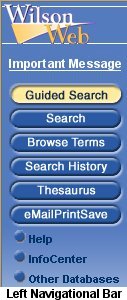 The Search screen, which is sometimes referred to as the Basic Search,
can be accessed by clicking on the icon located on the left navigational bar.
The Search screen is used for natural language searching and Boolean
searching. When a natural language search is entered the search engine factors
in a number of things including how often a word occurs in relation to the size
of the document and the proximity of the search terms. Search terms are
automatically stemmed and included in the search. To prevent automatic stemming
enclose search terms in quotation marks.
The Search screen, which is sometimes referred to as the Basic Search,
can be accessed by clicking on the icon located on the left navigational bar.
The Search screen is used for natural language searching and Boolean
searching. When a natural language search is entered the search engine factors
in a number of things including how often a word occurs in relation to the size
of the document and the proximity of the search terms. Search terms are
automatically stemmed and included in the search. To prevent automatic stemming
enclose search terms in quotation marks.
The Search screen can also be used to construct searches using both
Search and Boolean operators. In addition to the basic Boolean operators the
Wilson Interface now provides users with a number of search operators. These
operators will appeal to the advanced searchers who need precise control over
their searches. Some of the unique operators include: paragraph, sentence and
wildcard. The paragraph and sentence operators allow you to search for terms
that must appear in either the same paragraph or sentence. The wildcard search
allows you to find specific forms of a word. Performing the following search:
<wildcard>'librar{y,ies,ian,ians}' for example would find: library, libraries,
librarian, librarians but it would not find librarianship or librarianships. The
syntax of the search has to be exact in order for it to work. The word wildcard
must be in brackets and the rest of the search must be enclosed in single
quotes. Lastly you can NOT put spaces between the commas and the word endings.
For those advanced searchers who would like to learn more, a complete list of
operators can be found in help under the heading of: Boolean Operators. More
information about how searches are performed can be found in the InfoCenter in
the document titled Search Rules.
Allana Novotny
Network Services Librarian
Nebraska Library Commission
SERIALS SOLUTIONS ANNOUNCES TWO NEW LINKING SERVICES
Journal Linker™ and Article Linker™
will provide new options for linking between electronic resources
Serials Solutions announced on December 5, 2002, the development of two new
linking services: Journal Linker™
and Article Linker™.
Both services provide new options for linking between a library's electronic
resources. Journal Linker is available to all Serials Solutions clients today.
Article Linker will be released in early 2003.
Journal Linker enables patrons to link from an abstract or index to a list of
all the library's full-text holdings for that journal. From there, patrons can
link to the full-text in any of the library's electronic resources. In addition,
Journal Linker will display local print and microform collections, and will link
to the journal's MARC record in most OPACs.
"We're very excited to offer Journal Linker as a free service enhancement to our
A-to-Z title lists and full MARC records service," commented Peter McCracken,
MLS, Co-Founder of Serials Solutions. "Journal Linker provides the most
important benefits of OpenURL resolvers at a fraction of the cost. Now every
library can afford linking between their electronic resources."
For libraries interested in a full-featured OpenURL resolver, Serials Solutions
will be releasing Article Linker in early 2003. Article Linker will accept
OpenURLs and provide article-level links and extended services such as links to
interlibrary loan services. Like Journal Linker, Article Linker will take
advantage of Serials Solutions' accurate holdings data, hosting services and
knowledgeable customer support.
"Serials Solutions has enjoyed tremendous success by providing real solutions to
librarians and patrons," McCracken added. "Our A-to-Z lists help librarians and
patrons manage and access their e-journal collections. Our full MARC records,
Journal Linker and Article Linker services are natural extensions of our
expertise in managing this complex data. These are powerful, easy-to-use, and
affordable services for librarians and their patrons."
About Serials Solutions:
Serials Solutions LLC provides comprehensive e-journal access services to over
1000 libraries worldwide. Founded by a librarian for librarians, Serials
Solutions helps librarians and patrons manage and retrieve electronic content
through a variety of services. For more information, please visit <http://www.serialssolutions.com>.
Shannon Behrhorst
Network Services Director
Nebraska Library Commission
| N3 |
|
|
Discounts |
H.W. WILSON SPRING PROMOTION
The H.W. Wilson Company has announced an exciting Spring promotion. Academic
libraries can take advantage of significant discounts on Education Full Text,
Library Literature Full Text, and the new electronic version of the
Bibliographic Index.
Public, Community College, and School Librarians will find attractive pricing on
the Readers Guide Full Text Select, Readers Guide Full Text and more. This
exceptional promotion ends March 24!
For more information:
Academic Librarians click here: <http://www.hwwilson.com/print/discounts_offers/discountpgms_academic.htm>
Community College Librarians click here:
<http://www.hwwilson.com/print/discounts_offers/discountpgms_college.htm>
Public Librarians click here:
<http://www.hwwilson.com/print/discounts_offers/discountpgms_public.htm>
School Librarians click here
<http://www.hwwilson.com/print/discounts_offers/discountpgms_K12.htm>
Shannon Behrhorst
Network Services Director
Nebraska Library Commission
VERNON LIBRARY SUPPLIES OFFERS DISCOUNT TO NEBRASKA LIBRARIES
Vernon Library Supplies is now offering the following direct discounts to Nebraska libraries through the Nebraska Library Commission for the 2003 year:
Libraries must reference the Nebraska Library Commission when they order to
receive the discount.
Orders can be placed by phone, fax, mail or on-line at the Vernon Library
Supplies website, <http://www.vernlib.com>.
Vernon can supply libraries with a 2003 catalog upon request.
VERNON LIBRARY SUPPLIES, INC.
2851 Cole Court
Norcross, GA 30071
Toll free: 800-878-0253
Fax: 800-466-1165
E-mail: <vernon@vernlib.com>
Web site: <http://www.vernlib.com>
COMPUTERS IN LIBRARIES CONFERENCE DISCOUNT
NEBASE is offering a group discount to all Nebraska librarians who attend
the Computers in Libraries 2003 conference. The conference is planned for March
12-14 at the Washington Hilton & Towers in Washington, DC. Detailed information
about the conference can be found on the conference web page at <http://www.infotoday.com/cil2003/default.htm>.
The price of the conference with the discount is $155.00 for the three-day event
(March 12-14). This is more than a 55 percent savings off the regular price. No
discount rates are available for the pre- or post-conference seminars and
workshops.
In addition, discount prices of $99.00 on the Computers in School Libraries
conference and $185.00 for the combo of Computers in School Libraries and
Computers in Libraries general conference are also available.
To register for the conference, print off the registration form located at <http://www.infotoday.com/cil2003/CIL2003Registration.pdf>.
Mail the completed form to Jodene Glaesemann at the address below. Payment must
accompany your registration form. Please make checks or money orders payable to
Information Today, Inc. To receive the discount your registration MUST be sent
to the Nebraska Library Commission. Completed registration forms must be
received by February 1.
Jodene Glaesemann
Nebraska Library Commission
The Atrium
1200 N St., Suite 120
Lincoln, NE 68508-2023
Phone: 800-307-2665 or 402-471-4009
INGRAM LIBRARY SERVICES EXTENDS DISCOUNTS TO PUBLIC SCHOOLS
Ingram Library Services has extended its discount program, previously available
only to state-funded colleges, universities and public libraries, to all public
school libraries in the State of Nebraska.
Discounts:
