|
January/February 2006 Page 2
OCLC PRODUCT OF THE
MONTH: OCLC ONLINE SERVICE CENTER
MORE THAN JUST A WEB STORE
The OCLC Online Service Center is the convenient new way for you to purchase
various OCLC products and services and manage your OCLC account information. The
Web-based Online Service Center was designed to save you time and effort, which
in turn saves your library money.
The Online Service Center is being rolled out in phases. Today, libraries can
view, update and manage their OCLC account information. You can also order and
renew individual institution FirstSearch subscriptions, purchase blocks of
searches, and view FirstSearch account information in a secure online
environment-including order status, order history, and group purchases made on
your behalf. In the future, OCLC will add online ordering for services including
cataloging, reference, and collection analysis tools.
More information about the OCLC Online Service Center is available on the web at
http://www.oclc.org/servicecenter.
There you will find a Guided Tour which will show you the basics of account
management and FirstSearch ordering capabilities. The Frequently Asked Questions
will give you more background information about the new service.
In addition, NEBASE has scheduled an online session to teach you more about the
OCLC Online Service Center. The session will be held on February 2 from
2:00-3:00pm (Central Time). The session will be recorded for anyone who may want
to see it again or who cannot attend it at the scheduled time.
For more information and to register to attend this session, please go to our
NEBASE Online Sessions web site at
/netserv/training/onlinesessions/index.html.
If you have any questions about the OCLC Online Service Center, contact Christa Burns at 402-471-3107, or 800-307-2665.
Christa Burns
OCLC Member Services Coordinator
Nebraska Library Commission
Back to Contents
OCLC RELEASES INTERNATIONAL LIBRARY
RESEARCH REPORT
OCLC has found that information consumers view libraries as places to borrow
print books, but they are unaware of the rich electronic content they can access
through libraries.
The findings are part of Perceptions of Libraries and Information Resources, a
report recently issued by OCLC. The new report, based on surveys of information
users across six countries administered by Harris Interactive on behalf of OCLC,
is a follow-up to The 2003 OCLC Environmental Scan: Pattern Recognition, the
award-winning report that describes issues and trends that are impacting and
will impact OCLC and libraries.
Among the findings of the Perceptions report:
- Respondents use search engines to begin an information search (84 percent).
One percent begin an information search on a library Web site.
- Information consumers use the library but they use the library less and read
less since they began using the Internet.
- Borrowing print books is the library service used most; "Books" is the library
brand.
- Respondents do not trust purchased information more than free information.
- Ninety percent of respondents are satisfied with their most recent search for
information using a search engine.
- Information consumers like self-serve. They use personal knowledge and common
sense to judge if electronic information is trustworthy, and they
cross-reference other sites to validate their findings.
Perceptions of Libraries and Information Resources is available for download
free of charge at www.oclc.org/reports/2005perceptions.htm.
Print copies of the 286-page report are also available for purchase from the
same site.
View the full news release at
http://www.oclc.org/news/releases/200527.htm.
Christa Burns
OCLC Member Services Coordinator
Nebraska Library Commission
Back to Contents
OCLC MEMBERS COUNCIL MEETING
OCLC Members Council discusses opportunities to continue expanding the
collaborative worldwide
OCLC Members Council met in Dublin, Ohio, October 23-25, 2005, to discuss how
OCLC can strengthen its existing partnerships and expand the collaborative with
particular attention to smaller, rural libraries, and libraries of all sizes and
types around the world.
In preparation for the first meeting of the 2005-2006 Members Council, delegates
read OCLC reports on the Globalization of OCLC 2005 and Beyond and
Perceptions of Libraries and Information Resources. Delegates considered
these reports as they discussed how OCLC might extend the collaborative
worldwide and promote more effectively the kinds of services that libraries make
available to their users.
View the full story at:
http://www5.oclc.org/downloads/design/
abstracts/11142005/memberscouncil.htm
Read the October Members Council meeting minutes and presentations at:
http://www.oclc.org/memberscouncil/meetings/2006/default.htm.
Christa Burns
OCLC Member Services Coordinator
Nebraska Library Commission
Back to Contents
AMAZON.COM IS NEW FULFILLMENT PARTNER IN
THE OPEN WORLDCAT PROGRAM
Amazon.com has joined Baker & Taylor as a fulfillment partner within the Open
WorldCat program to facilitate the online purchase of books identified through
WorldCat. Now, Web searchers who reach WorldCat from popular search engines or
other Web resources may use a book buying link to purchase books through
Amazon.com, in addition to the initial pilot partner, Baker & Taylor.
This component of the Open WorldCat program not only connects Web searchers with
the materials they need; it also delivers a financial benefit to all libraries
that participate in the program. Each time a Web searcher purchases a book
through Open WorldCat, a portion of the proceeds supports the ongoing
development of Open WorldCat for the benefit of all participating libraries.
Web searchers reach the Open WorldCat interface from search results in Web
search engines or popular Web resources. Users may link directly to Amazon.com
from "Find in a Library" for some items. When a direct link is not available,
users will have the option of linking to the Amazon.com site to search for
similar items.
For more information:
Online purchasing pilot:
http://www.oclc.org/worldcat/open/store/default.htm.
Open WorldCat program:
http://www.oclc.org/worldcat/open/.
Christa Burns
OCLC Member Services Coordinator
Nebraska Library Commission
Back to Contents
WEBJUNCTION DECEMBER UPDATE
Check out these new additions to WebJunction (http://www.webjunction.org/),
the online community where library staff meet to share ideas, solve
problems and take online courses.
December WebJunction Focus: Mapping Technology in Your Library
Are there hidden technology riches in your library? WebJunction has
enlisted experts and practitioners from the field to help you prepare a
treasure map (perhaps better known as a "technology plan") and keep it
fresh and relevant amid the shifting goals of your daily work.
Go to: http://webjunction.org/do/DisplayContent?id=11992.
Chatting With Confidence: Instant Messaging Security
Instant messaging is rapidly becoming one of the most popular online
communication tools. Instant messaging programs include MSN Messenger, AOL
Instant Messenger, and Yahoo Messenger. For some users, especially
teenagers and young adults, it is the preferred way to keep in touch
online. Unfortunately, just as with email, there are security risks with
using instant messaging programs. Visit WebJunction for tips that will
help you keep your computer safe when using instant message or online chat
programs.
Go to: http://webjunction.org/do/DisplayContent?id=11993.
Phishing: Don't Get Caught!
Phishing is a deceptive email and Web site practice that may place you and
your users at risk. Learn how to avoid phishing schemes on WebJunction.
Go to: http://webjunction.org/do/DisplayContent?id=11433.
Perry Carnegie Library (OK) is WebJunction December Library of the Month
Staff at the Perry Carnegie Library in Oklahoma used resources in
WebJunction's Tech Planning section and TechAtlas to develop a technology
plan that works for their library. With a plan in place, it's now much
easier for the team to manage changes and new projects as they emerge.
Go to: http://webjunction.org/do/DisplayContent?id=12136.
Christa Burns
OCLC Member Services Coordinator
Nebraska Library Commission
Back to Contents
You Want to do
what?!?
You Want to do What?!? is a monthly column that features tips and
hints for using OCLC WorldCat Resource Sharing and OCLC Connexion.
OCLC WORLDCAT RESOURCE SHARING TIP: LABEL PRINTING IN OCLC WORLDCAT RESOURCE
SHARING
Instructions for printing 'Ship To' or 'Return To' labels using mail merge in
Microsoft® Word 2003 using the Request Manager file in OCLC WorldCat Resource
Sharing are now available at:
http://www.oclc.org/support/documentation/resourcesharing/using/print_labels/.
For additional assistance or answers to your questions, contact NEBASE or OCLC
Customer Support (800-848-5800 or
support@oclc.org).
OCLC CONNEXION TIP: CONNEXION BROWSER KEYSTROKES AND SHORTCUTS
Many users find that they work more efficiently if they avoid switching between
the keyboard and the mouse. Did you know that in Connexion you can control
headings, set holdings, call up a label display, and more, without moving your
hands from the keyboard?
Connexion browser has three kinds of keyboarding shortcuts:
- Navigation bar/tab activation. These keystrokes make a tab or button the
active element. They work from any place within Connexion. For example, try
<Alt><S> to bring up the Contact Support window.
- Searching and browsing with Connexion. These keystrokes bring up the
appropriate WorldCat search or browse screen or Authorities search or browse
screen when either the Cataloging or Authorities tab is active. So, you can
press <Ctrl><Shift><W> from an authority record to move to the Search WorldCat
screen.
- Whole record action commands within Cataloging or Authorities. These actions
can be reassigned to your choice of keystrokes (within the limits of
availability). For instance, if you decide that you want a keystroke shortcut
for labels, you can reassign <Ctrl><Shift><L> to mean View Label in Label
Program, rather than Edit Record. Remember, you can always use the mouse to
select actions from the appropriate list.
You can also use standard editing keystrokes, such as <Ctrl><C> to copy
highlighted text and <Ctrl><V> to paste copied text into a record.
When you use the Connexion browser, only a certain number of key combinations
are available for shortcuts (many keys are already used by the web browser
software itself). With the Connexion client, you can assign all actions to your
choice of keystrokes.
For a full list of Connexion browser shortcuts and options you can set, see the
documentation at:
http://www.oclc.org/support/documentation/connexion/browser/
gettingstarted/options_keyboard/
Christa Burns
OCLC Member Services Coordinator
Nebraska Library Commission
Back to Contents
FirstSearch Tips Page Updated
Nine tips have recently been added to the FirstSearch Tips page on OCLC-Web:
http://www.oclc.org/support/tips/firstsearch/default.htm.
These tips will help you to:
- Add links to OpenURL servers. Maximize the resources
your library already has by adding links on search results screens that lead
to OpenURL servers that you designate.
- Create custom library groups. Limit search results to holdings of libraries in a given geographical area or consortium, or to libraries with whom your patrons have borrowing privileges.
- Display all libraries. Give your patrons the option to view the holdings of all OCLC member libraries in FirstSearch.
- Make the FirstSearch search interface look the way you want it to. Display your library logo and image, add your consortium or group name, choose a color palette, and more.
- Set timeouts. Determine how long FirstSearch waits for a request before automatically ending a session.
- Set up links to other services. Add links to NetLibrary, JSTOR archives and Infotrieve document delivery.
- Set up the Resource Sharing interface through FirstSearch. Use OCLC Resource Sharing to handle your ILL requests, display holdings, enter lender strings, and more.
- Enable the FirstSearch/ILL link. Turn on a link in FirstSearch so your users can submit ILL requests during their search sessions.
- Customize the ILL Request Form. Choose which fields display on your ILL Request Form. Change field labels to reflect terminology used at your library, include customized notes that display to users.
[OCLC]
Back to Contents
FIRSTSEARCH CONTENT: DATABASES AND E-JOURNALS
Electronic Collections Online (ECO) - Sage Publications Per-Article Purchase
More than 300 titles from Sage Publications are now available by per-article
purchase on the FirstSearch Electronic Collections Online (ECO) database. This
brings the ECO per-article purchase total to 3,900 titles.
If you would like to turn on access for these journals, log on to the
FirstSearch Admin module at
http://firstsearch.oclc.org/admin, select the "Resource Sharing" tab, and
select "Journal Settings" from the dropdown list under
"Per-Article Purchase" in the menu at the left. For more information, see
http://www.oclc.org/electroniccollections/options/pau/default.htm.
FIRSTSEARCH FUNCTIONALITY
Pilot Project Launched: Book Buying Links in the Open WorldCat Program
OCLC has begun a pilot within the Open WorldCat program to facilitate the online
purchase of books identified through Open WorldCat. Web searchers who reach Open
WorldCat from popular search engines or other Web resources may use a book
buying link to purchase books through Baker & Taylor, a leading provider of
books, videos, music and other services to libraries, retailers and other
resellers.
Open WorldCat adds Web visibility to library resources by spotlighting them in
search results in popular Web resources. Many libraries have established "deep
links" that take users directly from a record in Open WorldCat to the matching
record in an individual library's Web catalog. Once connected to a library
catalog, users can determine whether or not an item can be used online, or
whether it can be borrowed from the library. The option to purchase books
complements access to library collections by facilitating the purchase of books
that may already be checked out of the library or for which long reserve lists
exist.
This new component of the Open WorldCat program not only connects Web searchers
with the materials they need, it also delivers a financial benefit to libraries
that participate in the program. Each time a Web searcher purchases a book
through Open WorldCat, a portion of the proceeds will be shared with Open
WorldCat libraries in one of two ways. The purchaser decides online whether to
apply a credit directly to the account of a selected Open WorldCat
participant library or to redirect the credit to support the ongoing development
of Open WorldCat for the benefit of all participating libraries.
In the introductory phase of book purchasing through Open WorldCat, Baker &
Taylor is the single supplier of books.Baker & Taylor will sell books from its
current inventory of over 500,000 titles. The book buying option will be visible
initially to users in the United States. OCLC hopes to expand this feature to
other content formats and additional partners, and to libraries outside the
United States in the future. OCLC will pursue the best prices and discounts
available for consumers, who will identify their library as part of the
transaction.
How it works
Web searchers reach the Open WorldCat interface from search results in Web
search engines or popular Web resources. A box displays for items available from
Baker & Taylor.
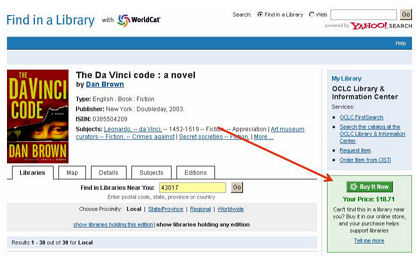
The link connects users to a screen where they can select a library to receive a
credit for the purchase, or opt to continue without selecting a library.
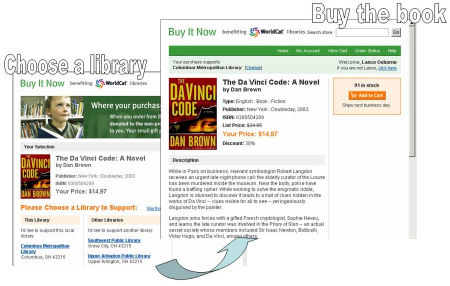
Each time a library is selected during a purchase transaction, a portion of the
sale will be applied as a credit on that library's next OCLC bill. When a
library is not selected, OCLC receives a portion of the sale to support the
ongoing
development of the Open WorldCat program for the benefit of libraries
everywhere. Once a library is selected, that library name will display at the
top of the purchase transaction screen. The purchase transaction will occur
between the purchaser and Baker & Taylor, and book purchasers will pay for their
purchases by credit card.
Donations to Libraries
The donations to individual libraries will appear in institution detail reports
as product code BKT6126 WORLDCAT BUY-IT CREDIT.
For more information about the Open WorldCat program, visit
http://www.oclc.org/worldcat/open/.
[OCLC - edited by Joyce Rambo, Reference & Digital Collections Librarian,
Nylink]
Back to Contents
Open WorldCat
Promotional Tools Now Available
Promotional tools for the Open WorldCat program are now
available on the OCLC Web site: http://www.oclc.org/worldcat/open/promote/default.htm.
These tools can help you inform Internet users in your community
that items in your collection can be located through the Web sites they use
every day, including Yahoo! Search and Google. Other tools allow you to
communicate to funding bodies the value that Open WorldCat adds to your
investment in OCLC membership. Download and use these tools to increase
awareness of
Web access to your library's resources through Open WorldCat and its "Find in a
Library" interface:
- Printable table tent
This eye-catching piece for display in library common areas tells your patrons
in simple step-by-step language how to use Google and Yahoo! to locate materials in your
library, and where they can download Open WorldCat-enabled browser toolbars.
- HTML e-mail
If you regularly send styled HTML mail to your patron base, you can copy the
text of a suggested promotional message and download one of two GIF-image illustrations to accompany it.
- Customizable news release
This news release template can be customized with information such as library
name, Web site URL, phone number and library spokesperson. Distribute it to community
newspapers, local Web sites, TV stations and other media.
- Customizable flier
This one-page information sheet provides an executive summary of Open WorldCat. Customize and use the flier to reinforce the value of your OCLC investment to funding bodies.
- Presentation slide
Library administrators can customize this PowerPoint slide and add it to presentations about their library and its value to their user community.
[OCLC]
Back to Contents
OCLC ILL NON-SUPPLIER STATUS
Attention OCLC ILL Staff....
Is your library closing for a long scheduled holiday? Are you or other members
of your ILL staff going on vacation? If so, you should update your ILL Policies
Directory record to change your library's ILL status from supplier to
non-supplier.
When a library establishes themselves as a non-supplier, their OCLC symbol is no
longer hot-linked in holdings displays, preventing their symbol from being added
to new ILL requests. In addition to checking supplier status at the time of the
request creation, the system also checks supplier status each time the request
moves to the next lender in a string. So, if your symbol has already been
included in a borrower's request before your library was switched to
non-supplier, the system will automatically skip your library and move to the
next symbol where the supplier status is again validated, and so on.
To update your ILL Policies Directory record:
- Go to the ILL Policies Directory at http://illpolicies.oclc.org. Log in to the
Policies Directory with your ILL authorization and password.
- On the Basic Search screen, click on MY UNITS in the upper right corner of
the screen to view and edit your own library's records.
- On the My Units screen, click on the CHANGE SUPPLIER STATUS button.
- On the Change OCLC ILL Supplier Status screen:
- Click on the Non-Supplier radio button
- Enter the beginning and ending date for which you will be a non-supplier
- Click on the SAVE button in the upper left corner of the screen
The system will give you a confirmation message
Log off the ILL Policies Directory
The change to non-supplier status can be made any day of the week and will
remain active until any day of the week you choose.
Christa Burns
OCLC Member Services Coordinator
Nebraska Library Commission
Back to Contents
OCLC ILL POLICIES DIRECTORY ENHANCEMENTS
On Sunday, November 13, OCLC's ILL Policies Directory (http://illpolicies.oclc.org)
was updated. Three drop-down lists with new values were added that users may
select when creating or updating their Policies Directory information. The
enhancements are being made in preparation for the auto-deflection work
tentatively planned for April 2006.
The additions to the drop-down lists are as follows:
- In the Unit Information, two new Library Type(s) were added -
"Community/Junior College Library" and "Music Library".
- In the Copy/Loan Policies, the new Format "Other" was added.
- In the Copy/Loan Policies, the new Delivery Type "Other" was added.
About the OCLC ILL Policies Directory
The OCLC ILL Policies Directory is the Web-based source of lending and copying
policies of libraries participating in WorldCat Resource Sharing. These policies
are the key to the efficient day-to-day operation of the system-they let other
libraries quickly determine if and how an item you hold can be borrowed.
Inaccurate or blank policies can "gum up the works" - time is lost when requests
are directed to libraries that cannot fill them, causing delays.
To maximize efficiency of the OCLC ILL process, your policies need to be present
and accurate in the Directory.
To access the ILL Policies Directory go to http://illpolicies.oclc.org
. Log on using your ILL Authorization number and Password. Once you are in the
Policies Directory, click My Units at the top of the screen to view and edit your own
library's records.
To help you update your policies, NEBASE held an online training session for the
Policies Directory which was recorded and is available online for you to view at
your leisure. To view the Policies Directory session, go to the Online Sessions
Archive web site at /netserv/training/
onlinesessions/archives.html#policies.
The recorded session is viewable from a web browser. You will need a sound card
and either earphones or speakers. There is no cost to view this recorded
session.
Instructions for entering your information into the ILL Policies Directory can
also be found in the reference card, Getting Started with the OCLC ILL Policies
Directory, which is available from the Directory web site at
http://www.oclc.org/support/documentation/ill/libpolicies/getstart/.
The OCLC ILL Policies Directory Quick Start Tutorial shows what information
you'll need to know in advance and guides you through the ILL Policies Directory
interface. You can view the PDF at
http://www.oclc.org/ill/migration/quickstart_policies.pdf.
In addition, Technical Bulletin 248: OCLC ILL Policies Directory, available at
http://www.oclc.org/support/documentation/ill/tb/248/, provides detailed
information about the OCLC ILL Policies Directory, including instructions on
using the Directory and screen shots.
For assistance with changes to your ILL Policies Directory record, please
contact Christa Burns
at NEBASE, 402-471-3107 or 800-307-2665 or OCLC
Customer Support (CSD) at 800-848-5800 or support@oclc.org.
Christa Burns
OCLC Member Services Coordinator
Nebraska Library Commission
Back to Contents
OCLC ANNOUNCES END OF CONNEXION BROWSER SUPPORT FOR
IE VERSIONS 5.0 AND 5.01
OCLC plans to end Connexion browser support for Internet Explorer versions 5.0
and 5.01 on February 19. At that time, Connexion browser users, including
CatExpress and WebDewey users, will no longer be able to log on using IE 5.0 and
IE 5.01.
For maximum functionality within OCLC Connexion browser, upgrade to Internet
Explorer 6.0. After February 19, Connexion browser will continue to support
Internet Explorer 5.5 and above, as well as Netscape 7, Netscape 8, Firefox and
Mozilla.
Christa Burns
OCLC Member Services Coordinator
Nebraska Library Commission
Back to Contents
CONNEXION CLIENT 1.30 END OF LIFE IS JANUARY 1
Connexion client version 1.50 was released on November 28. OCLC will
discontinue Connexion client 1.30 on January 1. As of January 1, you will
not be able to log on with version 1.30. To verify your version number, go
to the Help menu and select About OCLC Connexion Client.
If you have not yet upgraded to version 1.40 or 1.50, you will receive a
reminder that the newest version, 1.50, is available each time you start
the client. This message appears only when the software is started; it is
not tied to logging on or using the software.
Client 1.40 users will receive this pop up notification starting in early
January, and the end of life for client 1.40 is March 1.
For more information on upgrading to client 1.50 and to download the
software, see
http://www.oclc.org/connexion/interface/client/enhancements/recent.htm.
Christa Burns
OCLC Member Services Coordinator
Nebraska Library Commission
Back to Contents
CONNEXION CLIENT VERSION 1.50 IS NOW AVAILABLE!
Client 1.50 includes Unicode export, additional WorldCat searching
customization, simplified process for adding/deleting holdings, and more.
See
http://www.oclc.org/connexion/interface/client/enhancements/recent.htm
to read more about the changes and to download the software. A summary of
changes is listed below.
Please review the "Update the Connexion client" section of the getting
started document at
http://www.oclc.org/support/documentation/
connexion/client/gettingstarted/gettingstarted/#update_client.fm prior
to upgrading to client 1.50.
OCLC will discontinue client 1.30 on January 1. As of this date, you
cannot log on with client 1.30. OCLC will discontinue client 1.40 on March
1. As of this date, you cannot log on with client 1.40. To verify
your version number, go to the Help menu and select About OCLC Connexion
Client. The complete version number is 1.50.2146.28406.
Client 1.50 enhancements include:
Batch set or delete holdings without having to retrieve the records first
Enter or import a list of OCLC control numbers and specify to Update
Holdings, Produce and Update Holdings, or Delete Holdings using menu item
Batch, Holdings by OCLC Number. Run the batch to set or delete holdings
based on the control number without downloading the records before taking
the actions. Specify whether holdings should be set on records your
library already holds. View a report summarizing the batch.
Apply constant data automatically to records downloaded via batch
searching
Optionally, apply your default constant data record to all records
downloaded via batch searching, similar to the option to assign a My
Status value to all downloaded records. Set this option under Batch,
Process Batch, Search Options.
Customize short index list in Search and Browse WorldCat dialogs
In the Search WorldCat and Browse WorldCat dialogs, select the customize
button to customize the short drop-down list of indexes. Add, remove, or
change the order of indexes. In the Browse WorldCat dialog, "Title phrase
(ti=)" has been added to the full index list.
Limit WorldCat searches by Material Type using drop-down list of values
In the Search WorldCat dialog, limit your search by Material Type such as
biography, CD audio, DVD video, and fiction using a short list of 10
pre-selected material types or a complete list of over 100 types. Or
customize the short list by adding, removing, or changing the order of
material types.
WorldCat truncated lists
WorldCat truncated lists are displayed by default for searches that result
in 6-100 matches. The truncated list now shows whether the item is held by
your library. Optionally, click the right-mouse button and select List
Settings to add columns to the truncated list to display the total number
of holdings on the record and the OCLC control number.
Fixed field elements
View drop-down lists for valid values for each fixed field element,
similar to what was previously available in CatME. Optionally, turn off
this feature by unselecting "Use dropdowns for fixed fields" under Tools,
Options, Record Display. Note: when the fixed field list display is on,
some keyboard navigation techniques change. <Up arrow> and <Down arrow>
move the cursor up and down in the current fixed field list only, not up
and down line by line.
Populate fields from other records
Automatically add linking field data by entering tag 760-787 and an OCLC
control number. Select Edit, Insert from Cited Record to derive the data
from the OCLC record you enter. The client populates the field for you.
This functionality was formerly available in the Connexion browser
interface only.
Set validation options
Customize the validation level used for setting holdings on existing
WorldCat records and for exporting bibliographic and authority records.
Choose among three levels -- none, basic, full -- under Tools, Options,
General, Validation Options. The default option is "none."
Define Start-up action
Define an action to be completed each time you open the client software.
Some examples include Logon, Logon + Search WorldCat, or Search Local File
(bibliographic). If the selection includes logon, the client logs you on
using your default authorization number and password. Specify a start-up
action under Tools, Options, Startup Options. Or, continue to specify a
macro to run automatically at startup.
Unicode export and import options
Export bibliographic and authority records in the Unicode 8-bit
environment. Or, continue to export in the MARC-8 format as with previous
versions of the client. Choose the option under Tools, Options, Export.
Note: the following local system vendors have successfully tested the
UTF-8 Unicode export option:
aVista and Learning Access ILS
Isacsoft/PortFolio 6.1
Mandarin Oasis®
Marcive, Inc.
Polaris Library Systems
SirsiDynix Corinthian, Horizon 8.0, and Unicorn GL3.1
Virtua
Import files of bibliographic and authority records in the Unicode format
into the online or local save file. Or, continue to import MARC-8 format
files as with previous versions of the client. Select File, Import,
Options to specify the format.
User Tools definition
User Tools 1-10 can be assigned to characters, macros, or text strings.
They can be accessed from the Tools, User Tools menu or from the 1-10
buttons on the toolbar. New with client 1.50, view a default description
of the user tool that shows on the Tools, User Tools menu list and in the
pop-up tool tip on the toolbar. Or customize the description in Tools,
User Tools, Assign, Modify Description. For example, the OCLC Four Figure
Dewey Cutter Macro default description is "Macro Dewey!FourFig".
Optionally, change to "Run Dewey Macro"
Macro commands
Use new macro commands IsHeadingControlled to determine if a field in a
bibliographic record contains a controlled heading and CopyRecord and
MoveRecord to copy and move records in local files.
Non-Latin script cataloging
When cataloging using the Chinese, Japanese, Korean, Arabic, Hebrew,
Cyrillic, and Greek scripts, only characters that can be converted to
MARC-8 are valid. From the Edit menu, select MARC-8 Characters, Verify to
easily check the record for invalid characters. All invalid characters in
the record are changed to a different color (default color is red;
customize the color under Tools, Options, Record Display, Invalid MARC-8
characters). Edit the characters before validating the record or taking a
final action. Optionally, continue to validate the record and receive
validation errors if the record contains invalid characters.
Create non-Latin script records without linked romanized fields.
Previously, dummy linked fields were created automatically that included
the placeholder data "<>.". Now, the client supports non-linked fields and
no longer creates the dummy fields except for the 245 field. In the
future, after previous versions of the Connexion client are no longer
supported, OCLC will replace WorldCat records that currently include the
placeholder data.
When cataloging using the Chinese, Japanese, and Korean scripts, use the
CJK E-Dictionary from the Tools menu to help select CJK characters that
are in MARC-8 (EACC for CJK use). The CJK E-Dictionary was previously
available in the OCLC CJK cataloging software.
When cataloging using the Arabic script, you can manually add Arabic
script to records with romanized data using Edit, Transliterate, Arabic.
Optionally, automatically add the Arabic script data when you retrieve
Arabic language records from WorldCat. Set this option and specify which
variable fields to automatically transliterate under Tools, Options,
International. Arabic script fields automatically added are noted with a
special character to the left of the tag number so that you can determine
fields that have auto-transliterated output to review.
German and Korean interfaces
Select a newly available German or Korean interface language, in addition
to English, Spanish, Chinese (simplified or traditional), or Japanese
interfaces, which are currently supported in client 1.40. Change the
interface language under Tools, Options, International.
Problem resolutions
Resolutions to several reported problems as listed in the Known Problems
document at
http://www.oclc.org/connexion/support/client_known_problems.htm.
Connexion client 1.40 enhancements
If you are upgrading from Connexion client version 1.30 to version 1.50,
you missed the version 1.40 enhancements, so they will be new to you. See
http://www.oclc.org/connexion/interface/client/enhancements/past.htm to
review the 1.40 enhancements.
David Whitehair
Connexion Client Product Manager
OCLC Cataloging and Metadata Services
Back to Contents
CONNEXION INSTALL FOR NOVEMBER
2005
OCLC installed the following changes to Connexion on November 13, 2005:
- A problem in Client 1.40 has been resolved that resulted in "an error
has occurred" message. This problem affected users who executed a search
in the LC Names and Subject Authority File, then selected a single record,
locked and replaced, and upon replacing the record, tried to navigate
forwards or backwards through the set of records.
- With this installation, the ability to control headings in the browser
from the Dublin Core template has been disabled. In Dublin Core template,
the following functionality is no longer present:
- the option to 'Control heading' from the functions drop-down list in DC
template view,
- the option to "Control all' from the actions menu in DC template view
However, the ability to uncontrol a heading in the browser on the
functions drop-down list in DC template view is a viable function.
Also, all controlled headings will be presented to users in the browser in
DC template view, and users can continue to click on links to view the
authority record.
Stopwords have been added for the Authorities Online Constant Data and
Online Save File databases in both the browser and the client, so that
they are consistent with the Bibliographic Online Constant Data and Online
Save File databases. The list of stopwords are: a, an, and, are, as, at,
be, by, for, from, in, is,of, on, or, that, the, to with, http, www.
With this install, WorldCat derived searches result sets will now sort
correctly regardless of diacritics. This will affect both client and
browser searching. This partially corrects a known problem. Keyword search
results are still affected. For more details, see the Connexion client
problems website
http://www.oclc.org/connexion/support/client_known_problems.htm
or the Connexion browser problems website
http://www.oclc.org/connexion/support/browser_known_problems.htm.
Christa Burns
OCLC Member Services Coordinator
Nebraska Library Commission
Back to Contents
CONNEXION BROWSER CATALOGING QUICK
REFERENCE AVAILABLE
A new quick reference from OCLC's Documentation Department provides the
essential information you need to use the Connexion Browser interface. The
Connexion Browser Cataloging Quick Reference provides essential
information about the following areas:
- Editing Records
- Using Constant Data
- Using the Save File
- Authority Control
- Creating Labels
- Exporting Records
- Taking Final Actions
- Support, Documentation and Training
- Frequently-used Keystrokes
To request a no-charge copy of this 8-page quick reference, send an e-mail
request to orders@oclc.org. When requesting printed copies, please specify
product code REF1109.
This quick reference is also available online, from the OCLC Web site at:
http://www.oclc.org/support/documentation/connexion/browser/.
Peter Insabella
Manager, Product Documentation Content
OCLC, Inc.
Back to Contents
CONNEXION CLIENT DOCUMENTATION AND TUTORIALS UPDATED
The Connexion client documentation on the Web site has been updated to reflect
the client 1.50 functionality. All contents of Help from within the client is
available in booklets on the Connexion Web site at
http://www.oclc.org/support/documentation/connexion/client/default.htm.
Or, you can access this Web site from within the client from the Help menu,
Useful Web Links, Client Documentation.
The Connexion client tutorials on the Web site have been updated to reflect the
client 1.50 functionality. The tutorials are available at
http://www.oclc.org/support/training/connexion/client/tutorial/default.htm.
Or, you can access this Web site from within the client from the Help menu,
Tutorial.
David Whitehair
Connexion Client Product Manager
OCLC Cataloging and Metadata Services
Back to Contents
WEBDEWEY/ABRIDGED WEBDEWEY NOVEMBER
2005 QUARTERLY UPDATE
WebDewey and Abridged WebDewey are updated quarterly. Both services contain the
latest version of the schedules, tables, Manual, and Relative Index entries from
their respective enhanced DDC databases. The hierarchical displays in WebDewey
and Abridged WebDewey feature updated main class and division captions (e.g.,
700 Arts & recreation; 790 Sports, games & entertainment).
WebDewey is a web-based version of the enhanced DDC 22 database. This November
2005 release includes:
- all updates to Dewey Decimal Classification, Edition 22, through September
2005 (corrections, new developments, new built numbers, and additional
electronic index terms)
- thousands of Library of Congress Subject Headings (LCSH) that have been
statistically mapped to Dewey numbers from records in WorldCat (the OCLC Online
Union Catalog) and intellectually mapped by DDC editors (through LCSH Weekly
List no. 2, 2005)
- thousands of Relative index terms and built numbers not available in print
- links from mapped LCSH to the LCSH authority records
- selected mappings from Medical Subject Headings (MeSH)
Abridged WebDewey is a web-based version of the enhanced Abridged 14 database.
This November 2005 release includes:
- all content from Abridged Edition 14, through September 2005
- LCSH that have been intellectually mapped to Dewey headings by DDC editors,
including mappings to Abridged Edition 13 numbers from the OCLC publication,
Subject Headings for Children
- links from mapped LCSH to the LCSH authority records
- mappings between abridged Dewey numbers and the 2005 update to the 18th
edition of H.W. Wilson's Sears List of Subject Headings
Christa Burns
OCLC Member Services Coordinator
Nebraska Library Commission
Back to Contents
OCLC WEBDEWEY TUTORIAL UPDATE
The OCLC WebDewey Tutorial has just been updated to include a section on linking
to your OPAC. It may be found at:
http://www.oclc.org/dewey/resources/tutorial/.
Additional recent improvements to the tutorial include, easier access, faster
loading and printing.
For more information on printing go to:
http://www.oclc.org/dewey/updates/tips/webdewey/tip31.htm.
If you have any questions, please contact Christa Burns
at 402-471-3107 or 800-307-2665.
Christa Burns
OCLC Member Services Coordinator
Nebraska Library Commission
Back to Contents
JOIN THE NEBASE DEWEY GROUP PURCHASE
Join the NEBASE Dewey Group - save money on the print and web versions of the
DDC!
NOTE: Libraries who wish to order any Dewey product DO NOT have to
be members of OCLC. Any library can subscribe - Dewey products are available to
both OCLC member and non-member libraries.
Dewey in Print
The NEBASE Dewey Group has been expanded to include the print versions of the
Abridged Edition 14 of the Dewey Decimal Classification and the 22nd edition
of the unabridged Dewey Decimal Classification.
OCLC is offering 10% off of the original price on the DDC 22 and
Abridged Edition 14 in print.
If your library is interested in ordering the DDC 22 or Abridged
Edition 14 in print, you will find pricing information and the online Order
Form at
/netserv/nebase/deweyorderbooks.html.
For more information about the DDC, please visit http://www.oclc.org/dewey/.
Dewey on the Web
Now your library can benefit from web-based access to an enhanced version of the
Dewey Decimal Classification (DDC) database through WebDewey or Abridged
WebDewey. OCLC is offering a discounted price to users who join the NEBASE Dewey
Group.
WebDewey and Abridged WebDewey, which correspond to the unabridged and abridged
print editions, are updated on a quarterly basis, bringing you ongoing updates
implemented by the Dewey editorial team almost as soon as they occur. The Web
versions also offer additional electronic functionality not available in the
print editions to make your classification work more efficient.
To see a hands-on demo of WebDewey, you can watch the NEBASE Introduction to
WebDewey online session which was recorded and is available online for you
to view at your leisure. The recorded session is viewable from a web browser.
You will need a sound card and either earphones or speakers. There is no cost to
view this recorded session. To view the WebDewey session, go to the Online
Sessions Archive web site at:
/netserv/training/onlinesessions/archives.html.
The current WebDewey & Abridged WebDewey Group subscription year runs from
January 1 - December 31. Libraries may join the WebDewey & Abridged
WebDewey Group at any time. Midyear subscriptions will be prorated. Orders must
be received by the 15th of the month for a start date of the 1st of the
following month.
If your library is interested in subscribing to WebDewey or Abridged WebDewey,
you will find pricing information and the online Order Form at
/netserv/nebase/deweyorder.html.
For more information about web access to the DDC, go to http://www.oclc.org/dewey/versions/default.htm.
If you have any questions about DDC 22, Abridged Edition 14, WebDewey, Abridged
WebDewey or the NEBASE Group, please contact Christa Burns
at 402-471-3107 or 800-307-2665.
Christa Burns
OCLC Member Services Coordinator
Nebraska Library Commission
Back to Contents
N³ (Ncubed) Newsletter is published bimonthly by the Nebraska
Library Commission Network Services team. It is the intent of Network Services
to promote and support libraries in their cooperative efforts to share resources
and information. Circulation: 600. Published on PC software. Editor: Shannon
Behrhorst. Word Processing: Jeannette Powell. ISSN 1082-4383 Send mail to: N³
Editor Nebraska Library Commission, The Atrium, 1200 N St., Suite 120, Lincoln,
NE, 68508 Phone: 402-471-4031 or 800-307-2665 Fax: 402-471-2083 E-mail:
Shannon Behrhorst Home
Page: /netserv/netserv.html.
|


